Adding Other Devices for Monitoring
ObserveOps (formerly known as AIOps) monitors IBM Tape Library devices, Commvault backup systems, and any IP-reachable device through Ping-based discovery. Create a discovery profile, run the discovery, then provision the results as monitors.
- IBM Tape Library
- Backup
- Ping
Adding IBM Tape Library Devices
ObserveOps supports SNMP-based discovery of IBM Tape Library devices.
1. Create a Discovery Profile
Go to Menu. Select Settings  . Select Discovery Settings
  . Select Discovery Profile. The Discovery Profile screen opens. Select Create Discovery Profile.
The Create Discovery Profile form opens. Select Other from the sidebar. Select IBM Tape Library.
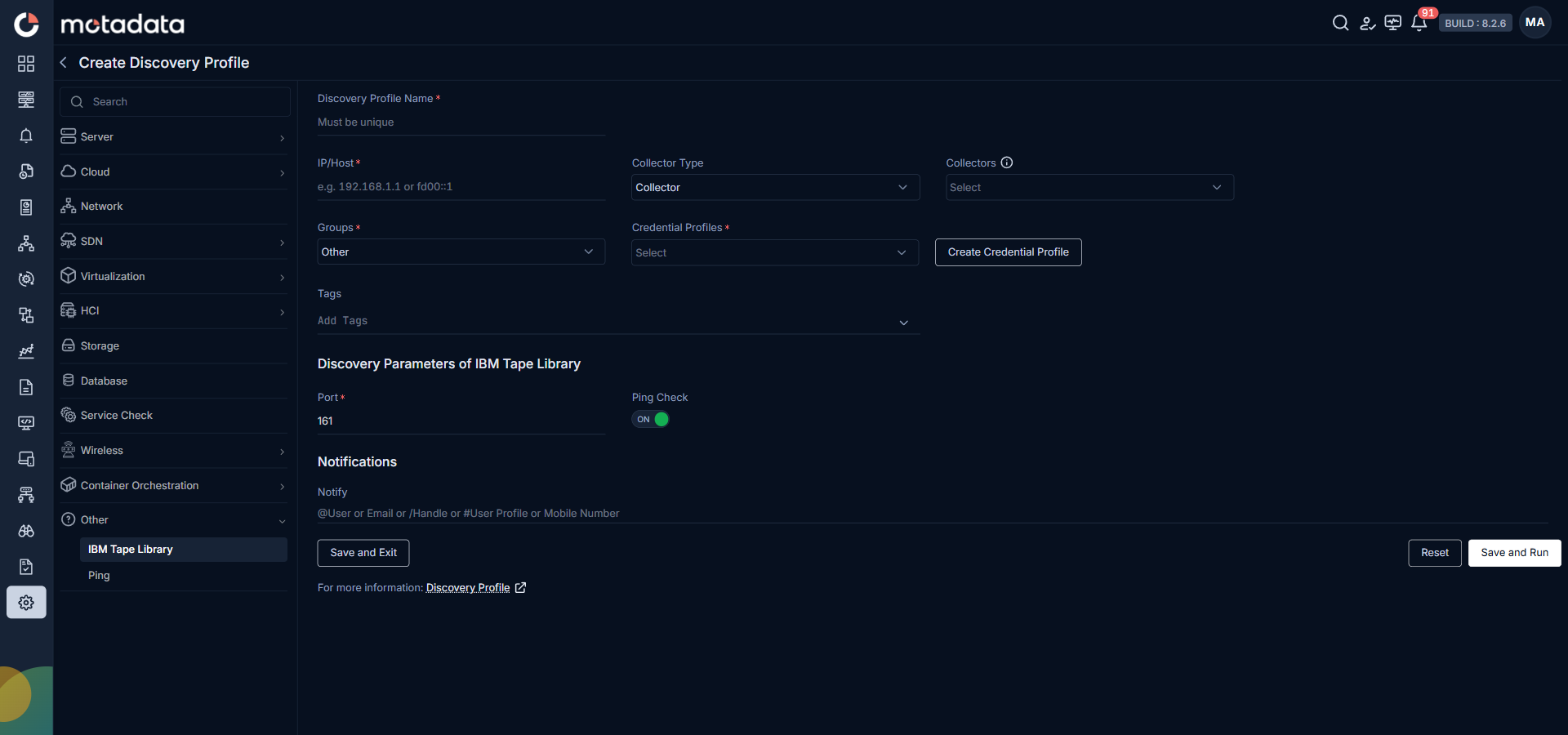
| Field | What to Enter |
|---|---|
| Discovery Profile Name | A unique name to identify this profile |
| IP / Host | The IP address of the IBM Tape Library |
| Collectors | One or more Collectors for data collection. If you skip this, ObserveOps selects a Collector automatically. |
| Groups | One or more Groups to assign to provisioned monitors |
| Credential Profile | Select an SNMP credential profile with the correct version and community string. You can create one using the Create Credential Profile button. |
| Tags | Tags to assign to discovered devices |
| Port | Defaults to 161. No change needed unless your device uses a different SNMP port. |
| Ping Check | On by default. Toggle off to discover devices that don't respond to ping. |
| Notify Team | Email addresses, handles, or user profiles to notify when discovery completes |
Select Save and Run to save and start discovery immediately. Select Save and Exit to save without running.
Adding Commvault Backup Systems
ObserveOps supports discovery of Commvault v11 backup systems through the REST API.
1. Create a Discovery Profile
Go to Menu. Select Settings . Select Discovery Settings . Select Discovery Profile. The Discovery Profile screen opens. Select Create Discovery Profile.
The Create Discovery Profile form opens. Select Other from the sidebar. Select Backup.
| Field | What to Enter |
|---|---|
| Discovery Profile Name | A unique name to identify this profile |
| IP / Host | The IP address or hostname of the Commvault CommServe |
| Collector Type | Select the Collector type used to reach the Commvault system |
| Collectors | One or more Collectors for data collection. If you skip this, ObserveOps selects a Collector automatically. |
| Vendor | Select Commvault. This is the only vendor available. |
| Groups | Groups to assign to provisioned monitors. Defaults to Other > Backup > Commvault. |
| Credential Profiles | Select a credential profile with valid Commvault API credentials. You can create one using the Create Credential Profile button. |
| Tags | Tags to assign to discovered devices |
| URL Type | Select HTTP or HTTPS based on how your Commvault API is exposed. Defaults to HTTPS. |
| Port | The port used by the Commvault API. Defaults to 443 for HTTPS and 80 for HTTP. |
| Ping Check | On by default. Toggle off to discover systems that don't respond to ping. |
| Notify Team | Email addresses, handles, or user profiles to notify when discovery completes |
Make sure the Commvault system is reachable from the server where ObserveOps is deployed.
Select Save and Run to save and start discovery immediately. Select Save and Exit to save without running.
After successful provisioning, the Commvault monitoring template is applied automatically from the Other > Backup section.
Adding Devices Using Ping Discovery
Ping discovery scans your network using ICMP checks to identify active devices. Use it when you want to discover devices without requiring credentials.
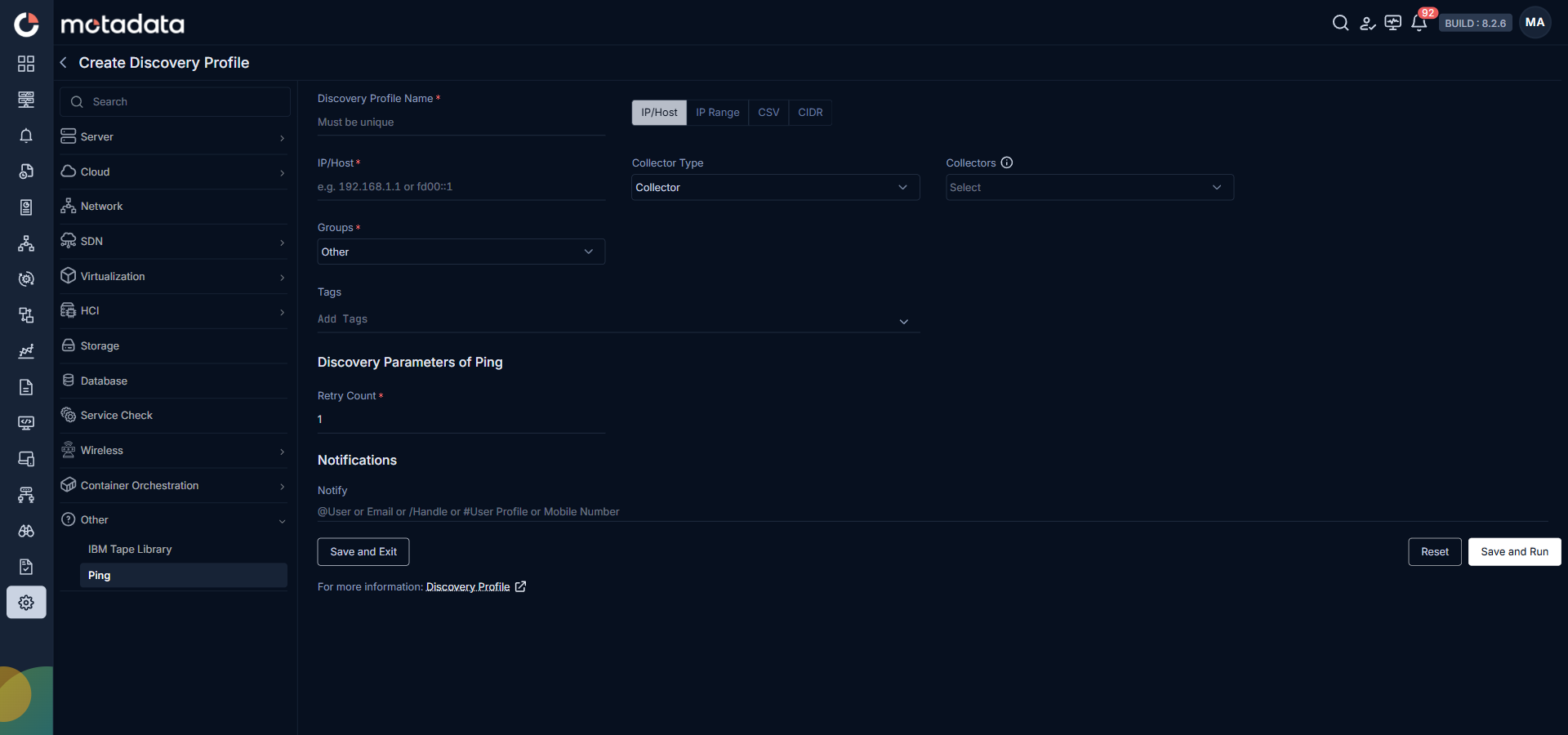
- IP/Host
- IP Range
- CSV
- CIDR
Using IP/Host
Use this method to ping a single IP address or hostname.
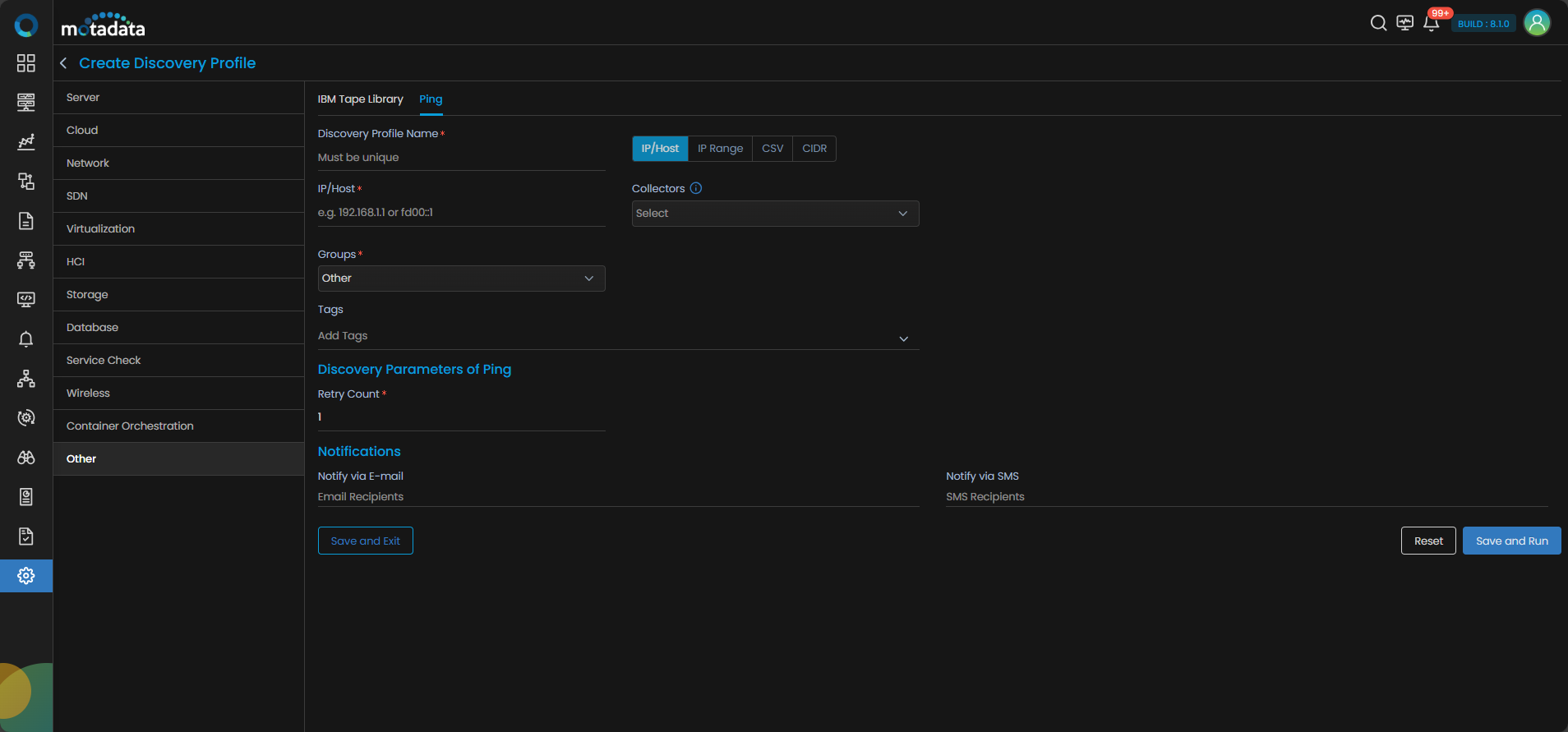
| Field | What to Enter |
|---|---|
| Discovery Profile Name | A unique name for this ping discovery profile |
| IP / Host | The single IP address or hostname to ping |
| Collectors | One or more Collectors for data collection. If you skip this, ObserveOps selects a Collector automatically. |
| Groups | One or more Groups to assign to discovered devices |
| Tags | Tags to assign to discovered devices |
| Retry Count | Number of retry attempts if the device doesn't respond. Default is 1. |
| Notify Team | Email addresses, handles, or user profiles to notify when discovery completes |
Select Save and Run to start discovery immediately.
Using IP Range
Use this method to scan a continuous range of IP addresses.
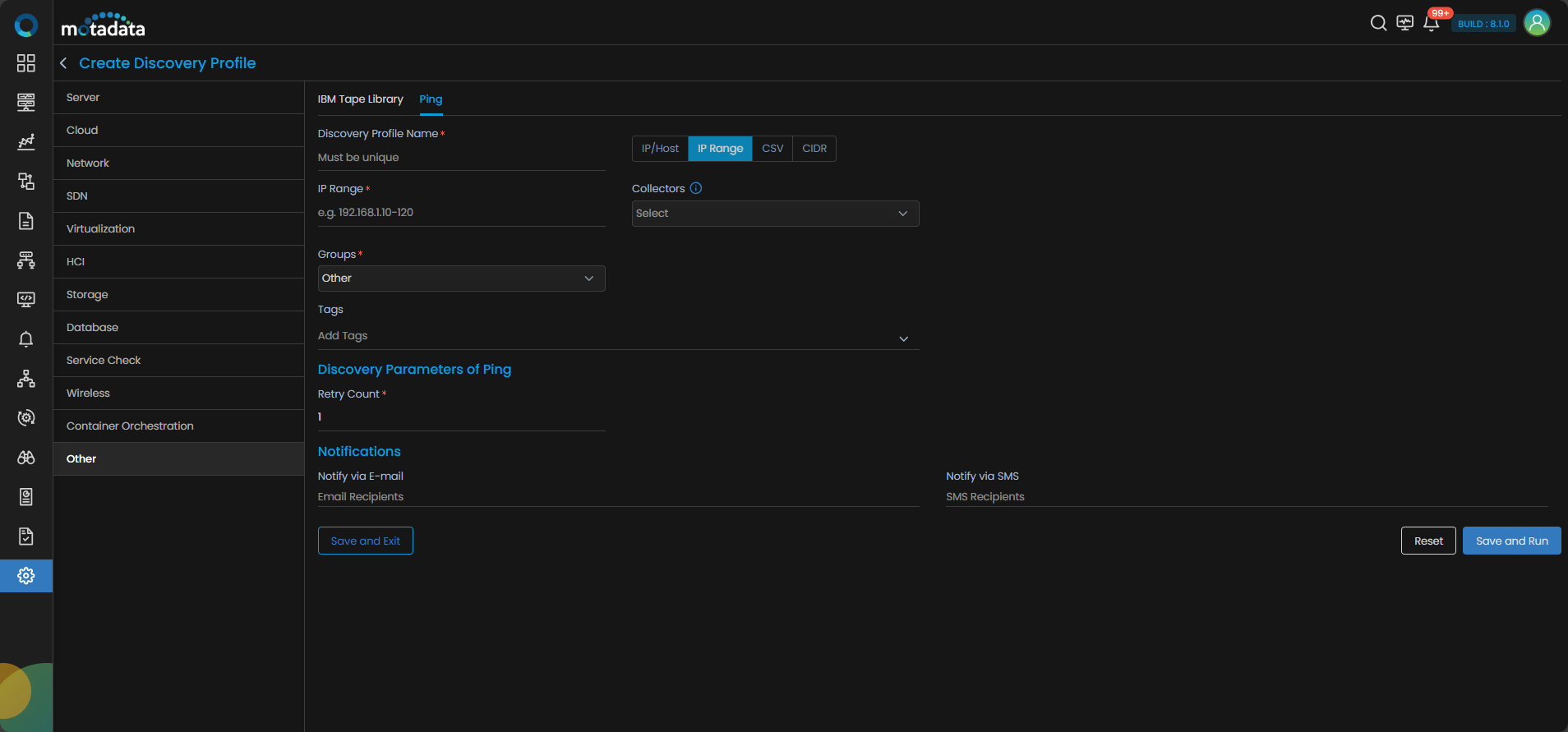
| Field | What to Enter |
|---|---|
| Discovery Profile Name | A unique name for this ping discovery profile |
| IP Range | The start and end IP addresses of the range to scan |
| Collectors | One or more Collectors for data collection. If you skip this, ObserveOps selects a Collector automatically. |
| Groups | One or more Groups to assign to discovered devices |
| Tags | Tags to assign to discovered devices |
| Retry Count | Number of retry attempts per address. Default is 1. |
| Notify Team | Email addresses, handles, or user profiles to notify when discovery completes |
Select Save and Run to start discovery immediately.
Using CSV Upload
Use this method to discover a list of IPs or hostnames from a file.
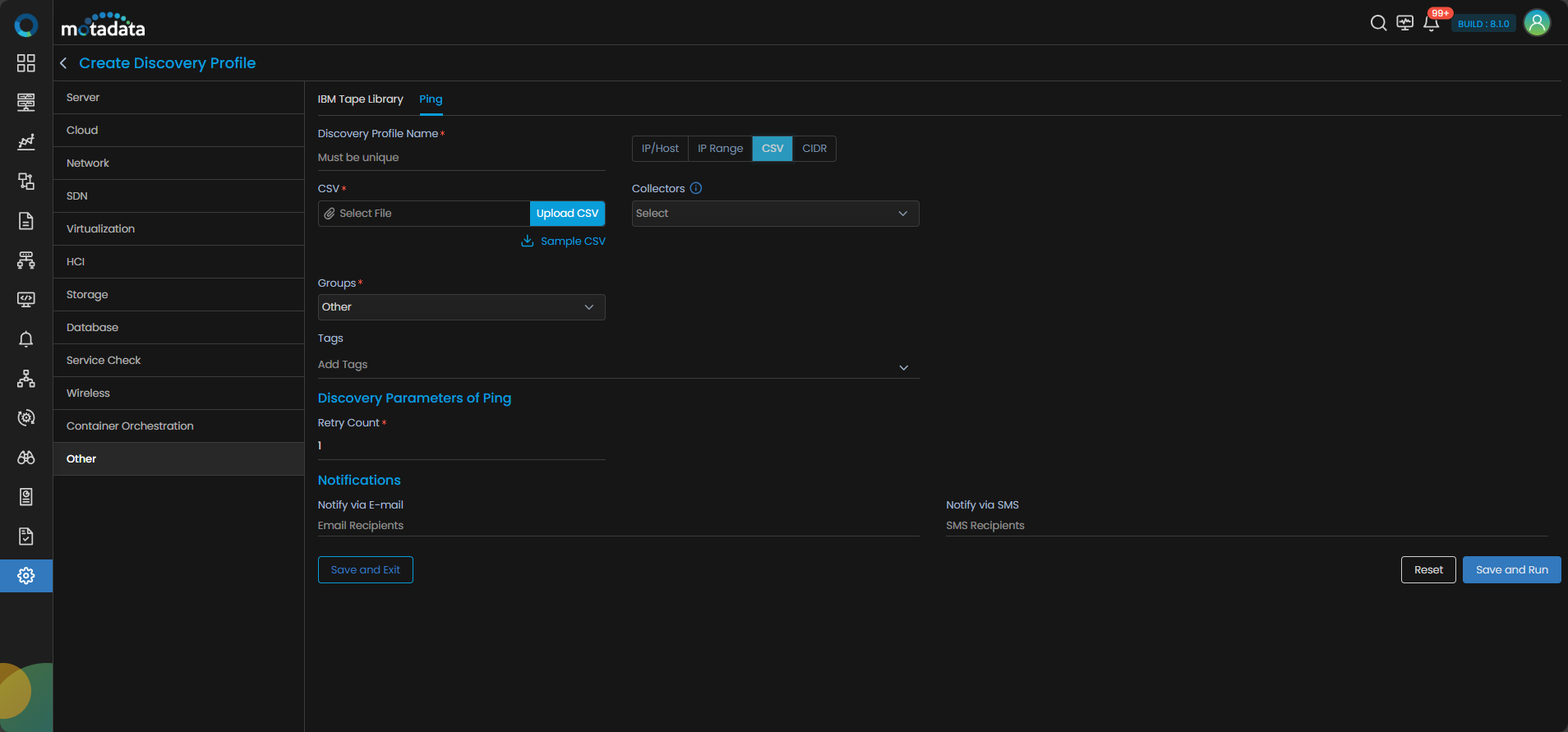
| Field | What to Enter |
|---|---|
| Discovery Profile Name | A unique name for this ping discovery profile |
| CSV | Upload a CSV file containing IP addresses or hostnames. Select Sample CSV to download the required format, fill in your addresses, then upload the file. |
| Collectors | One or more Collectors for data collection. If you skip this, ObserveOps selects a Collector automatically. |
| Groups | One or more Groups to assign to discovered devices |
| Tags | Tags to assign to discovered devices |
| Retry Count | Number of retry attempts for each address. Default is 1. |
| Notify Team | Email addresses, handles, or user profiles to notify when discovery completes |
Select Save and Run to start discovery immediately.
Using CIDR Format
Use this method to scan a subnet defined in CIDR notation.
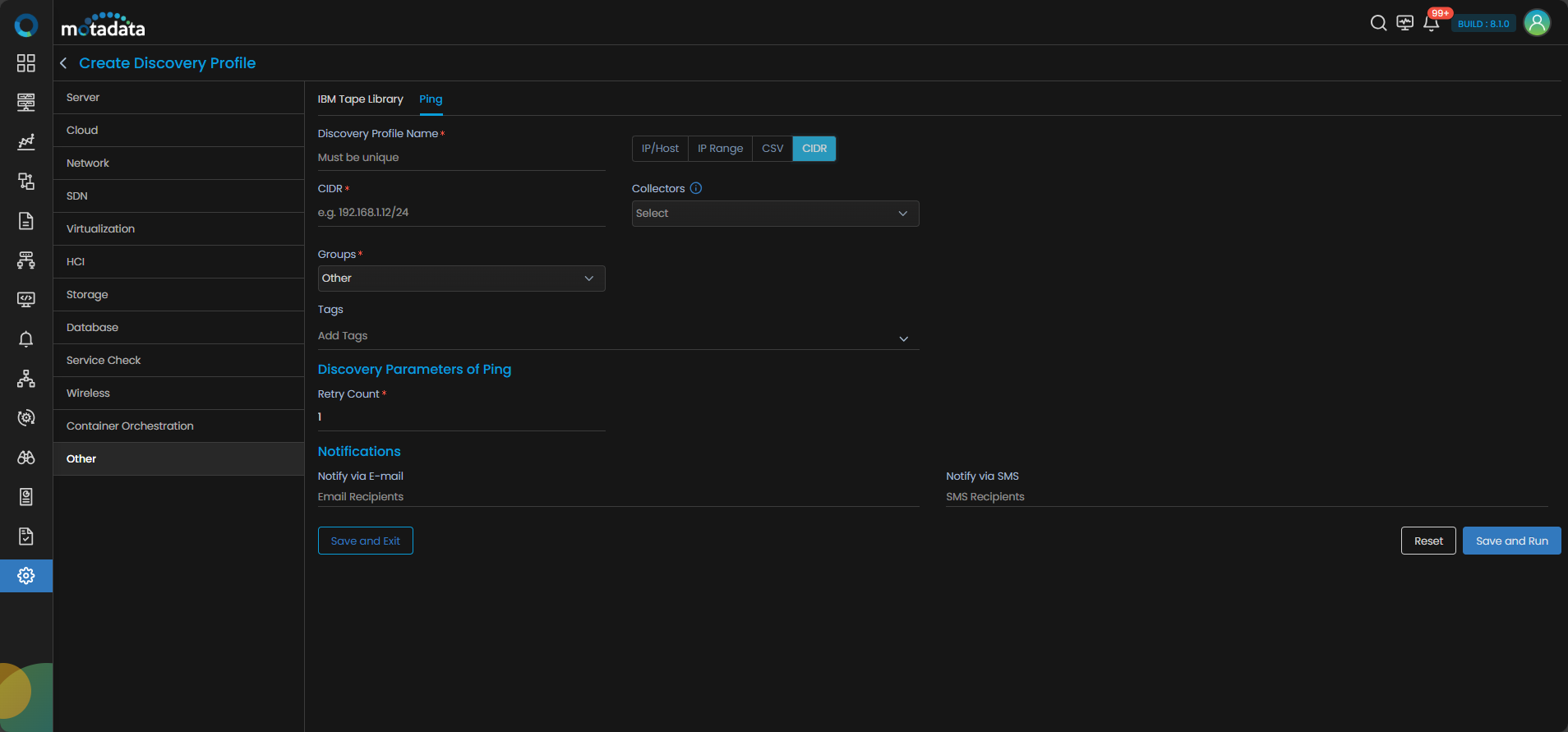
| Field | What to Enter |
|---|---|
| Discovery Profile Name | A unique name for this ping discovery profile |
| CIDR | The subnet in CIDR notation to scan |
| Groups | One or more Groups to assign to discovered devices |
| Tags | Tags to assign to discovered devices |
| Retry Count | Number of retry attempts on failure. Default is 1. |
| Notify Team | Email addresses, handles, or user profiles to notify when discovery completes |
Select Save and Run to start discovery immediately.